Console
View AI Usage for All Time
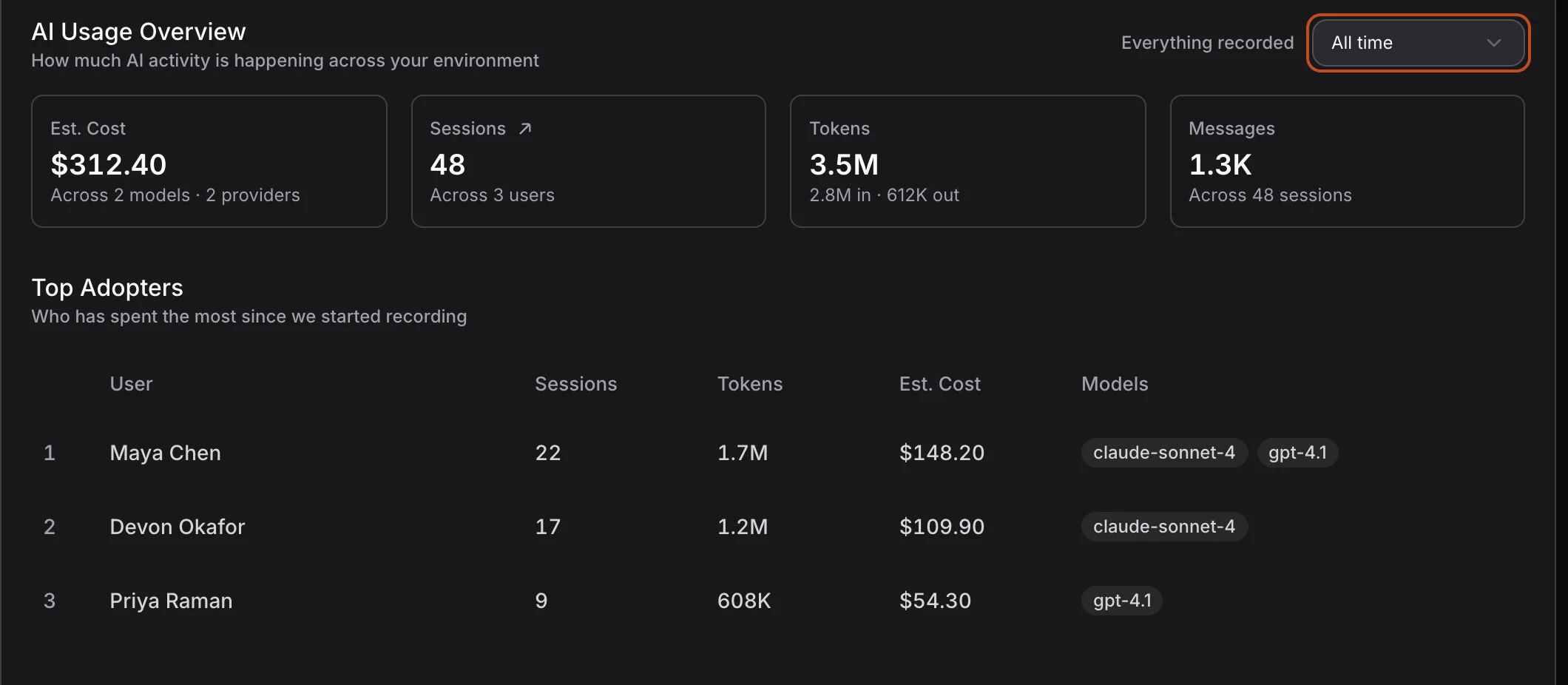
On the Insights page, the AI Usage tab’s range picker now has a third choice, All time, after Last 7 days and This month. All time shows everything Surface has recorded. In the Top Adopters table, it lists who has spent the most since recording began, as shown above.
All time has no earlier period to compare with. So the four cards show no change chips, and the Top Adopters table has no Trend column. The two day-by-day charts are hidden too, because a chart covering every day since recording began would be too crowded to read.
To keep All time fast, a background worker now adds up each day’s usage once the day is more than 16 days old, and stores the total in a daily rollup. All time reads these stored totals, and adds up only the last 16 days fresh, instead of every session ever recorded. On a test database with a million sessions, All time went from 9.2 seconds to 1.45 seconds, about as fast as Last 7 days. It stays that fast as your history grows.
Bug Fixes
On the Insights page, the Endpoints at Risk table now shows the same risk score, and the same Critical and High counts, as the Endpoints page. Previously, the two could disagree: for example, one device scored 4.5 on Insights and 3.8 on Endpoints.
The login page now follows the dark theme. Previously, if you signed out while using the dark theme, part of the login page stayed light.
Surface
My Device: Now in the Browser

The Surface menu opens from the Surface icon, in your menu bar or system tray. Clicking My Device in that menu now opens the console in your default browser. You don’t need to sign in: the link signs that browser tab in, as this computer, and the top of its sidebar reads My Device, as shown above. On an admin’s laptop, it opens the admin console. On a laptop that belongs to anyone else, it opens that person’s own pages, including this computer’s page. Previously, My Device opened a separate Surface window, and that window has now been removed.
To scan this computer right away, stay in the tab that My Device opened. If you aren’t already on this computer’s page, go there: open Endpoints, click this computer, then click ↗ next to its name. Then open the Actions menu, at the top right, and choose Scan now, as shown above. The Actions menu appears only in a My Device tab, on that computer’s own page. It doesn’t appear in a console tab you signed in to yourself.
The tab stays signed in for one hour. After that, the page says the link has expired; to continue, click My Device in the Surface menu again. If this computer isn’t signed in to Surface yet, My Device opens the console instead, where you can sign in.
Surface Finds octet
Surface now discovers octet, a coding agent that runs in the terminal. On Mac and Linux, it also finds octet’s skills, and the MCP servers it connects to. Skills and MCP servers are add-ons that give an agent new tools.
More Accurate Policy Findings
Surface’s policies now catch more real risks, and raise fewer false alarms. Some policies read the instructions that people write for AI agents. These policies no longer flag ordinary wording, or rules that forbid something, such as “Never run rm -rf”.
The policies for hooks, IDE permissions, VS Code tasks, and browser settings were tightened in the same way. For example, a VS Code task that downloads a file with curl is no longer flagged; a task that pipes a download straight into a shell still is. A managed Firefox or Safari browser no longer fails policies that apply only to Chrome and other Chromium browsers.
Policies that check prompts now ignore capital letters: a pattern written as “since you already…” now also catches “Since you already…”. VS Code extensions that ship native libraries, meaning compiled code bundled inside the extension, are now flagged, just as JetBrains plugins already were.
Last Sent Logs Show the Date
In the Surface menu, Troubleshoot › Send Logs to Support uploads this computer’s recent logs, so SuperAlign support can look into a problem. Afterwards, the Last sent row below it shows the reference code to give your support contact. That row now shows the date as well as the time, for example, Last sent: IYF4-2K4X, Nov 6 20:09. Previously, it showed only the time, so an older send could look like one from today.
Macs Show Their Real Name
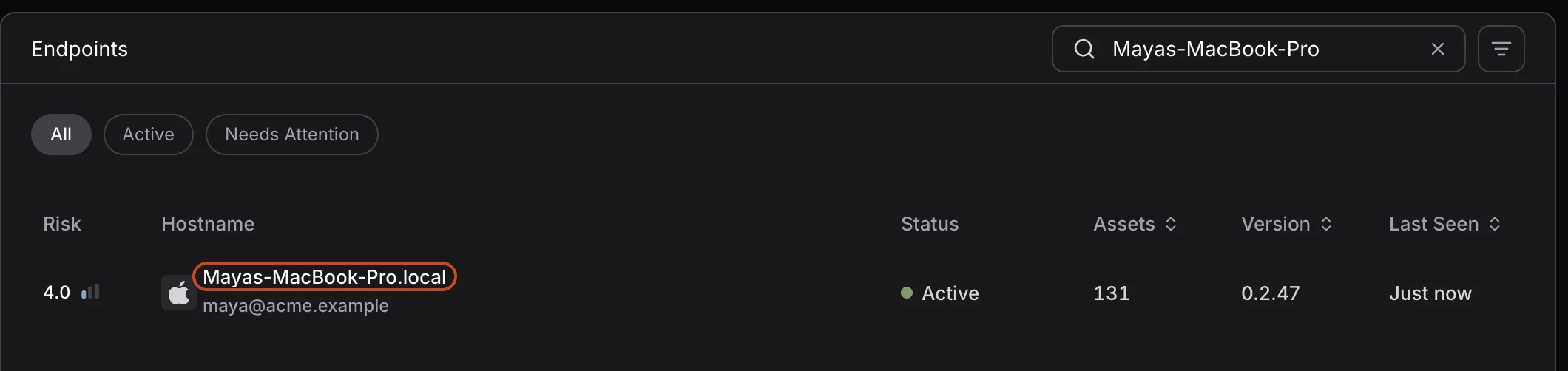
For a Mac, the console now shows the computer’s local hostname, for example, Mayas-MacBook-Pro.local. You can find it in System Settings › General › Sharing. Previously, the console could show a temporary name from the network instead, for example, 192.168.1.101. Each Mac’s name changes once: the next time Surface scans it.